

Interac e-Transfer is supported for Canadian customers now.
Steps:
Step 1. When checking out, select 'Direct Bank Transfer Discount' payment option. The discounted amount will be showing and Total will be updated. Place Order.
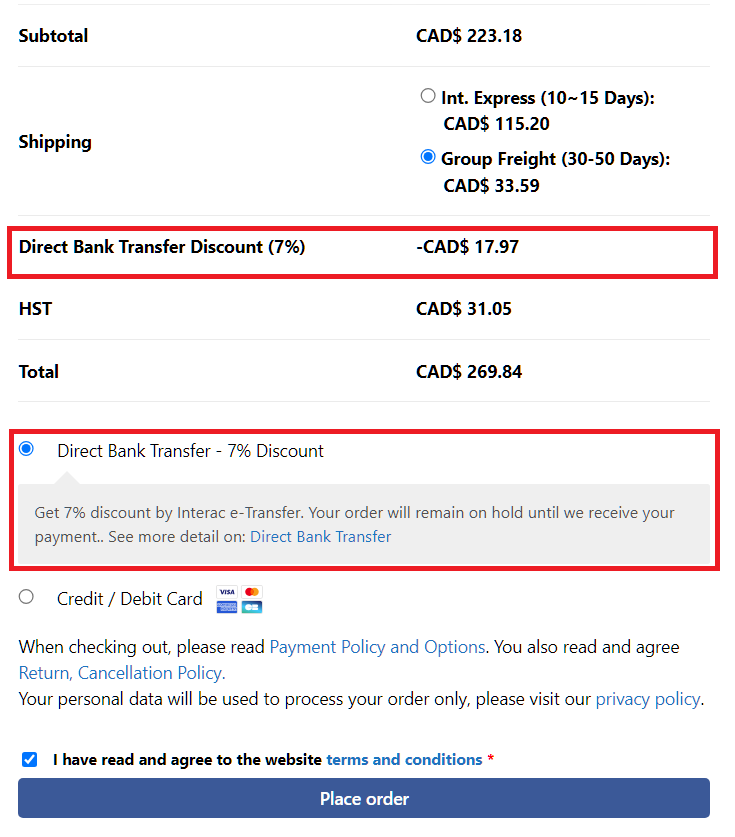
Step 2. If you are a registered user, your order will appear under My Account → Orders. If you check out as a guest, you will receive an email confirming your order.
Your order will be placed On Hold for 4 hours while we wait for your bank payment. If we do not receive the payment within this 4-hour window, the order will be automatically cancelled, and the reserved products will be returned to inventory.
Step 3. Make a payment
- From your Canadian bank account
- Select Interac e-Transer
- Recipient Email: [email protected]
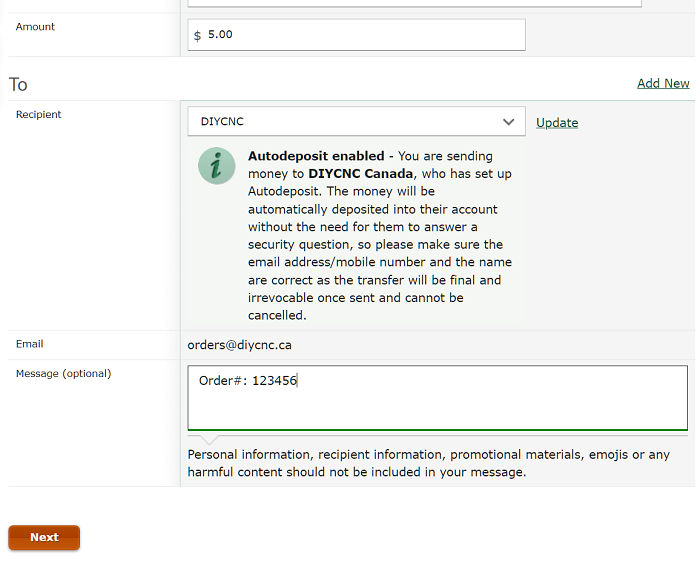
- Put the order# in the message box. The example below shows the TD Bank e-Transfer page. Other banks and financial institutions may have different interfaces.
Step 4, Once we have received and verified your e-Transfer, your order status will change to Processing, and you will receive a confirmation email.