Forum

Notifications
Clear all

Custom Length Items Ordering

7 Posts
3 Users
0 Reactions
471 Views
Posts: 2
Admin
Topic starter
Member
Joined: 5 years ago
[#33]
Important Notice: Due to frequent changes in processing fees, transportation costs, and customs duties, we currently accept custom length metal products (Aluminum Extrusion, Linear Rail, Ball Screw etc.) only from registered users. This allows suppliers of customized products to review the latest costs and shipping fees and attach an adjuestment under your account, the user can decide whether to accept or reject the extra fee to continue or cancel the order. You may also contact us before placing your order if your cart contains a custom length metal product.

Custom lengths may apply to products such as aluminum extrusions, linear rails, linear rods, ball screws, etc.

There are several reasons you may consider the custom length:
    • You buy what exact you need to save your cost and time;
    • Saving shipping cost. (Longer merchandises may cost higher shipping fee);
    • Professional cut by manufacture (if shipped from manufacture directly (*)
Customize length (any length other than listing, normally 100cm and 40 inch):

(Notes: the maximum length is 200cm(~79 inch) for Aluminum Extrusion, Ball Screw, Lead Screw, Linear Screw, Linear Rods etc. Any length longer than 200 cm (up to 6 meters / 600 cm per single piece), we will need to provide a special quote based on your location and quantity.  Wire, Timing Belt, Cable Chain are not in this category)

There are two types customizing length products: Length as Qty and Length Range.

Length as Quantity

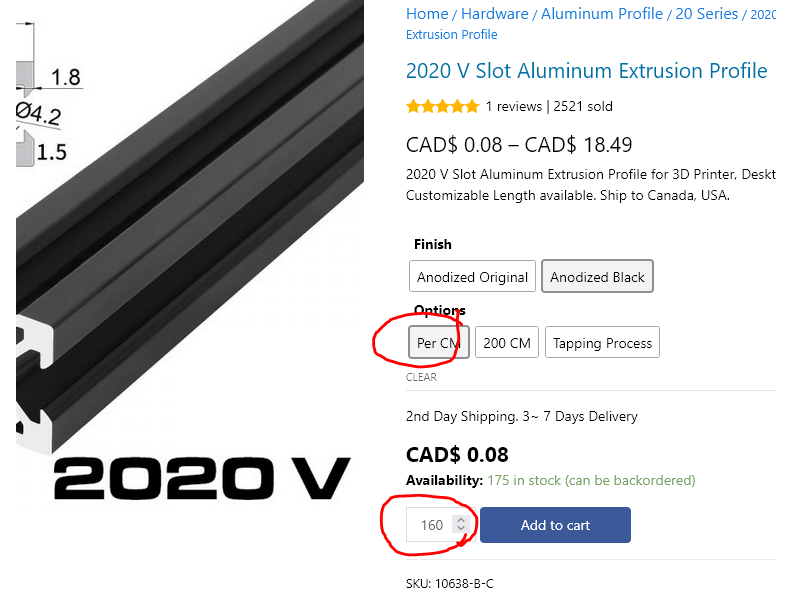
      • Select Per CM (One Centimeter) Option. Single CM (Centimeter) option is the minimal unit of the customization length.
      • Input total length (units per-cm). For example, if you need 160cm:
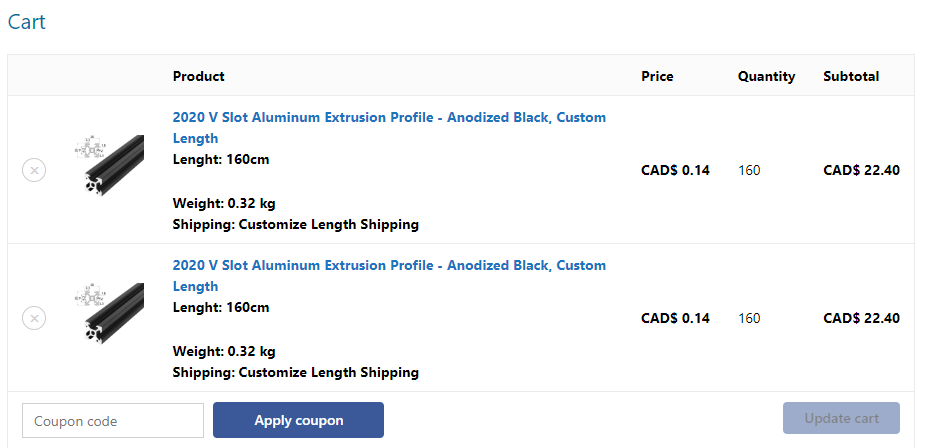
        • If you need multiple same custom length items, add multiple times one by one. Your shopping cart will look this:
          • Notes: Customize Length items in Shopping Cart cannot be modified, if you selected wrong number, you have to delete it and re-add the correct item.
          • Once all item (includes custom items or normal items), click Proceed to checkout
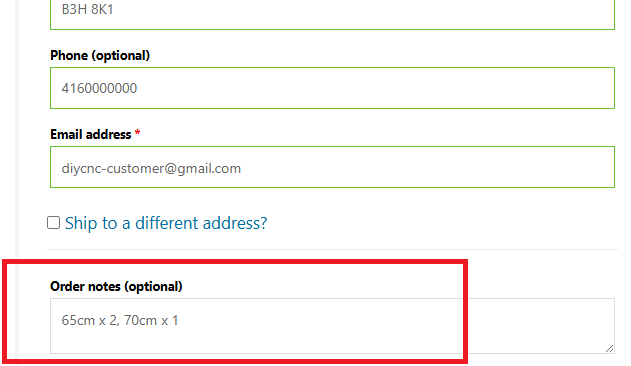
          • In the Checkout page, you can also put necessary comments in the Order Notes box to ensure your customizing process.

Length Range Products

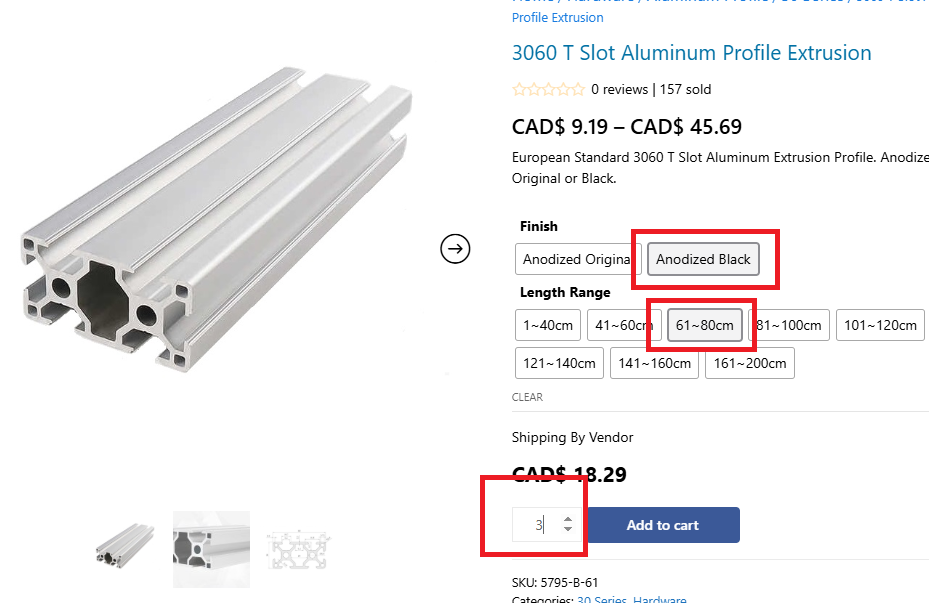
            • Select Length Range.  The Quantity box is now the quantity of selected product instead of length. 

            • When checking out, put the detail length and quantity in the Order Notes box

Notes:

            • Any custom-cut length may result in a tolerance. The cutting tolerance of aluminum profiles can reach up to the thickness of the cutting saw blade. If you have specific accuracy requirements, please indicate them in the 'Order Notes' when checking out.
            • All custom length cuts, mechanical operations, or transportation may cause scratches, dents, or wear on anodized, sandblasted, or other metal or non-metal surface finishes. Unless specifically noted in the ‘Order Notes’, these normal occurrences during processing will not be considered valid reasons for after-sales service.
            • All cutting and other mechanical operations may produce metal shavings, debris, and sharp metal edges. Please handle with extra care upon receiving the goods.


6 Replies
Posts: 3
Customer
New Member
Joined: 3 months ago

This is a great help but I have one question, How do I add tapped 5mm holes at both ends of custom length extrusions?


Reply
1 Reply
Frank
Admin
Joined: 4 months ago

Member
Posts: 32

Hi,

For each extrusion product, there is an option called “Tapping Process.” You can add this as an extra service to your shopping cart. It is priced per hole.
Depending on the aluminum extrusion you select, there may be one or more holes at each end of the profile. It is best to refer to the profile specifications to determine the appropriate tap size.
For example, if the profile’s hole size is Ø4.1 mm, the tap size should be Ø5 mm. If the hole size is Ø5.1 mm, the tap size should be Ø6 mm. For 30 and 40 series profiles, the most common tapping size is Ø8 mm. So far, we only do the Metric unites.

Also, when checking out, there is an “Order Notes” textbox where you can enter the size or any additional processing instructions. For example, “5 mm tap for each end.”

HTH

Frank

Posted by: depark88

This is a great help but I have one question, How do I add tapped 5mm holes at both ends of custom length extrusions?


Reply
Posts: 3
Customer
New Member
Joined: 3 months ago

Thanks Frank I'll have a look. I wonder how long backordered extrusions will take to come in.


Reply
1 Reply
Frank
Admin
Joined: 4 months ago

Member
Posts: 32

Currently, we keep only a limited selection of aluminum profiles in stock for 3D printing and CNC projects. These materials are available for 'pre-order' only. Shipping time and options will be displayed on the checkout page. 

Posted by: depark88

Thanks Frank I'll have a look. I wonder how long backordered extrusions will take to come in.


Reply
Posts: 3
Customer
New Member
Joined: 3 months ago

Not sure how to select a custom length and tapped holes on  both ends. The site does not seem to be responding currently.


Reply
1 Reply
Frank
Admin
Joined: 4 months ago

Member
Posts: 32

Please read again the first post of the this topic. 🙂 

There is no 'both ends' option for the tapping holes, you have to speicify the process on the 'Order Notes' when checking out. For example if you order 2 x 50cm PCs 2020 (one hole on each end), so the total tapping process will be 2 x 2 = 4

1) Add twice 50 (qty) to the shopping cart;

2) Add 4 'Tapping Process' to the shopping cart; 

3) Put 'Ø5mm tapping on both ends of (2020) .....' on the 'Order Notes' when checking out.

Posted by: depark88

Not sure how to select a custom length and tapped holes on  both ends. The site does not seem to be responding currently.


Reply
Share: